
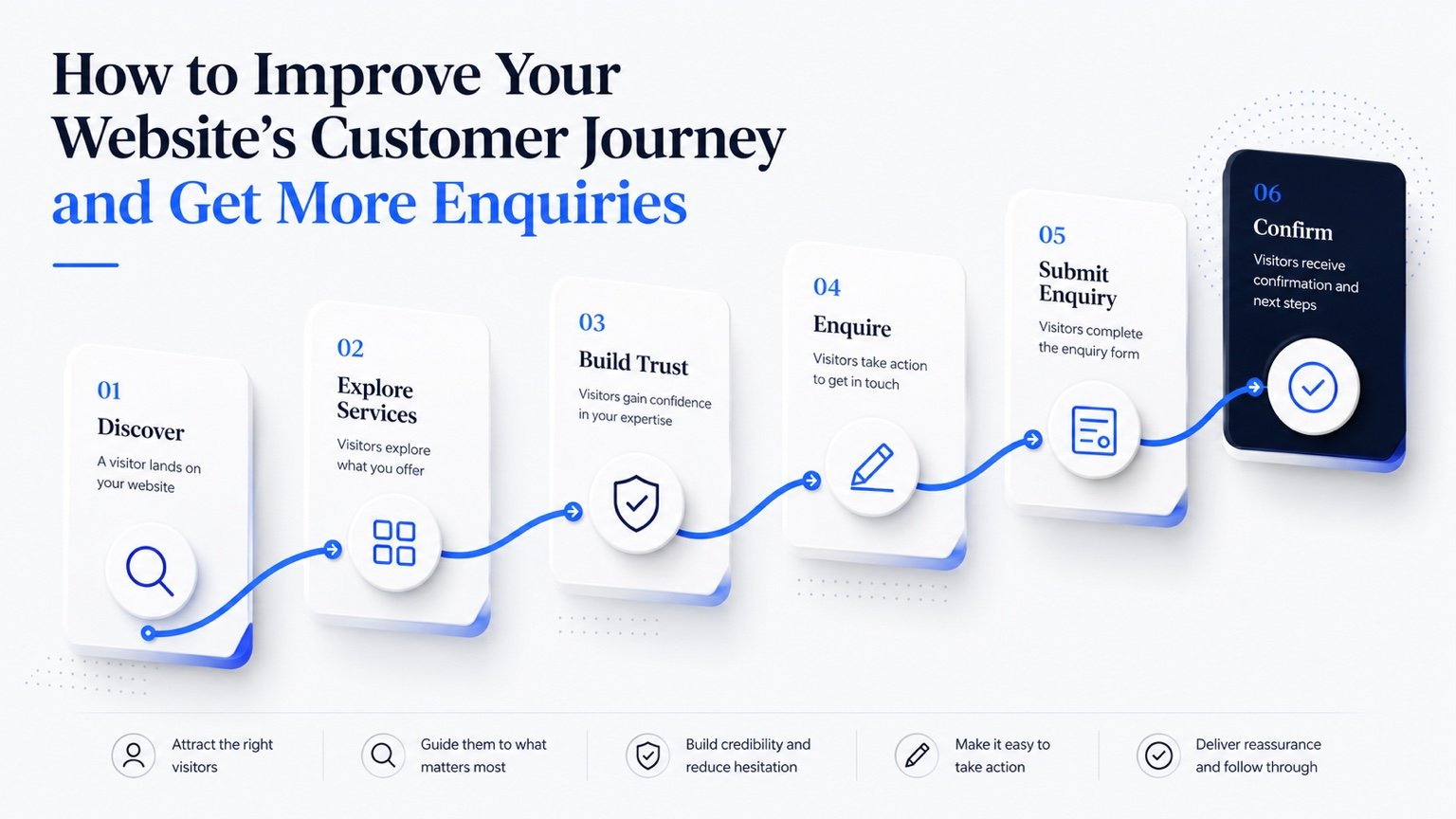
Getting more enquiries from a website is not always about attracting more traffic.
Sometimes the bigger opportunity is improving what happens after someone arrives.
A potential customer may already be interested in what the business offers, but if they cannot quickly understand the service, find the information they need, build confidence or work out what to do next, they may leave without making contact.
That entire experience is part of the website customer journey.
Discover → Explore → Trust → Act → Enquire
The objective is not to pressure visitors into taking action. It is to remove unnecessary friction so that interested customers can make a confident decision.
What Is a Website Customer Journey?
A website customer journey is the sequence of steps a visitor takes from first discovering the website through to completing a meaningful action.
Depending on the business, that action could be submitting an enquiry, requesting a quote, booking an appointment, making a purchase, registering interest or arranging a consultation.
The journey can begin before the visitor reaches the website. For example:
Another visitor may follow a recommendation to the homepage, explore a service, make a booking and receive confirmation. The website should support that journey rather than forcing the customer to work out the process themselves.
Start With the Visitor’s Goal
Businesses naturally think about websites from their own perspective. They organise pages around internal departments, services or terminology.
Customers often think differently. A visitor may simply want to know:
- Can you solve my problem?
- Is this service right for me?
- How much does it cost?
- Can I trust this business?
- How do I book?
- What happens next?
The stronger the website, the faster those questions are answered.
When reviewing a page, ask: What is the visitor trying to achieve here? Then make sure the content and next step support that goal.
Make the First Impression Clear
A visitor should quickly understand what the business offers, who it is for, why it matters and where to go next.
A visually attractive homepage can still perform poorly if the message is unclear. Avoid making visitors interpret vague slogans before they understand the actual service.
Clear message + relevant value + obvious next step
If the website receives traffic but few leads, review the wider causes in Why Your Business Website Isn’t Generating Enquiries.
Simplify Navigation
Navigation should help visitors make decisions.
Too many menu items, overlapping pages or vague labels can make a website feel more complicated than the business actually is.
A useful navigation structure should help customers quickly find services, pricing where appropriate, booking or enquiry options, key information, proof and contact details.
The goal is not necessarily to minimise the number of pages. It is to make the structure logical.
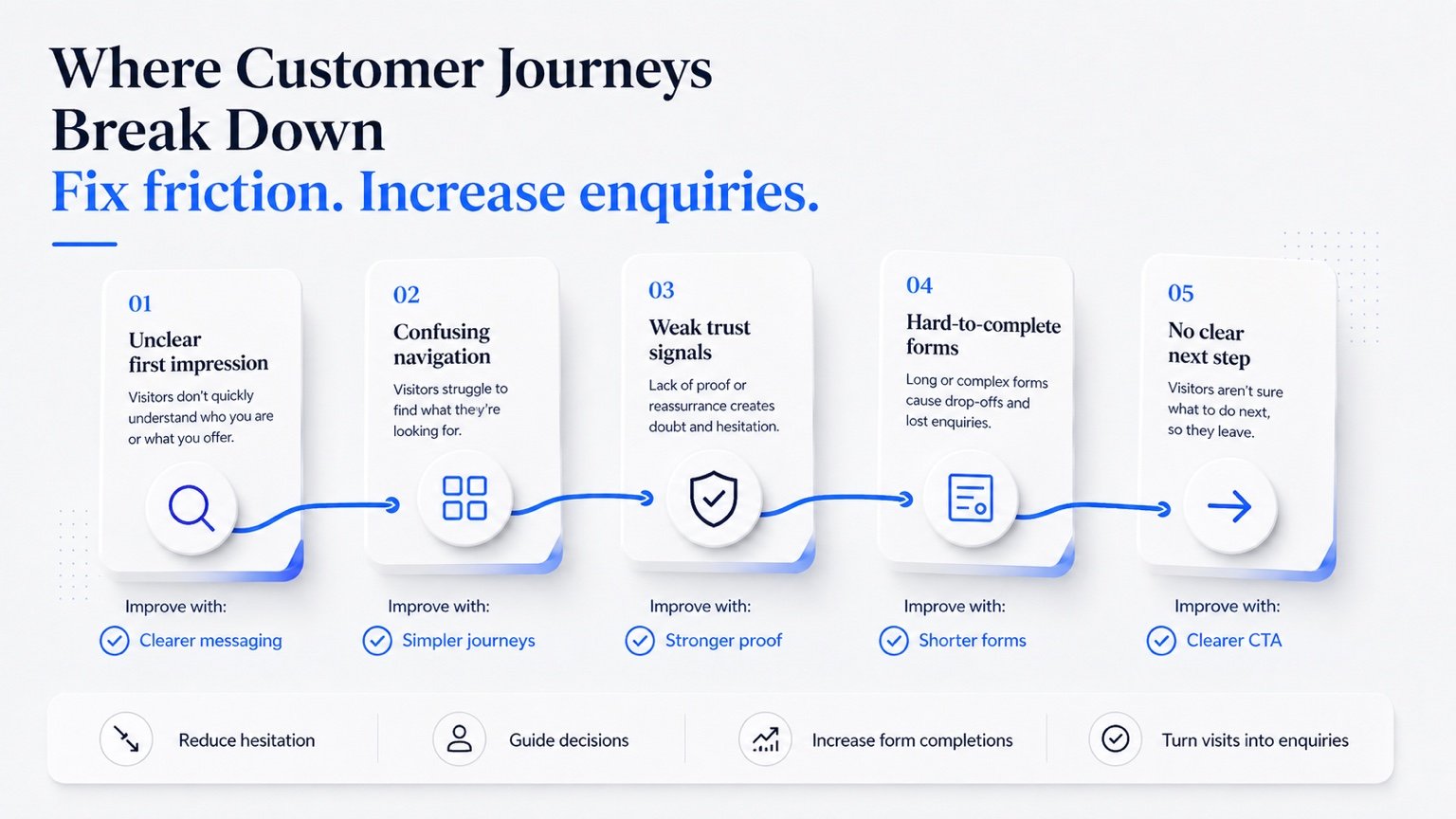
Where Customer Journeys Break Down
Many lost enquiries happen because of small friction points rather than one major failure.
Typical issues include unclear messaging, confusing navigation, weak trust signals, difficult forms and no obvious next step. The graphic below shows several common places where visitors can drop out of the journey.
Build Trust Before Asking for Action
Before someone submits a form or makes a booking, they usually need enough confidence to proceed.
Useful trust signals can include:
- genuine reviews
- clear team information
- relevant qualifications
- case studies
- transparent contact details
- clear policies
- professional presentation
- secure payments where applicable
- evidence of experience
- a clear explanation of the process
The right trust signals depend on the sector. Healthcare businesses, for example, may need stronger reassurance around professional credibility, patient experience and privacy than a typical retail business.
Trust should appear naturally throughout the journey rather than being confined to one testimonials page.
Make Service Pages Decision-Friendly
A service page should help someone decide whether the service is relevant to them.
Useful information may include what the service is, who it is for, the problem it solves, what the process involves, what happens next, pricing or starting prices where appropriate, FAQs and booking or enquiry options.
A visitor who still has major unanswered questions is less likely to take action.
Do not overload the page with unnecessary information. Give the customer enough information to make the next decision confidently. Where useful, transparent pricing guidance can reduce uncertainty.
Make Calls to Action Obvious
A call to action should make the next step clear. Examples include Get a Free Quote, Book an Appointment, Request a Consultation, Enquire Now, View Pricing or Speak to Our Team.
Calls to action should appear where they are useful, not randomly throughout the page.
When the visitor becomes ready, can they immediately see what to do next?
If not, there is friction.
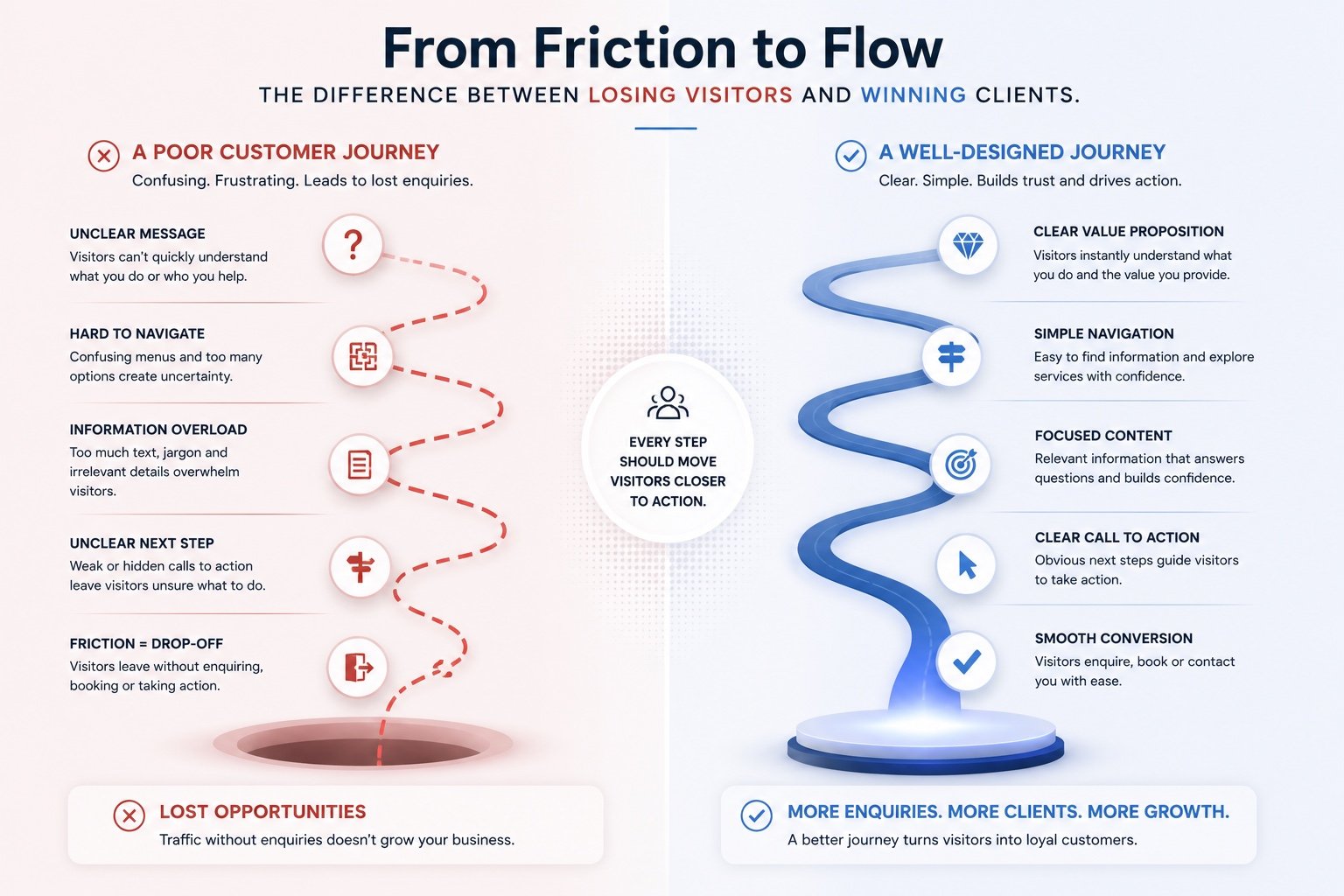
From Friction to Flow
A poor customer journey makes visitors repeatedly stop and think. A strong journey does the opposite.
It gives customers clear information, simple choices and confidence at each stage. The goal is not to remove every decision. It is to remove unnecessary uncertainty.
Simplify Enquiry Forms
The more difficult a form feels, the greater the chance that someone abandons it.
For an initial enquiry, ask only for information genuinely required at that stage. Typical essentials might include name, email, phone where relevant, the service required and a short message.
More detailed qualification questions can often be collected later.
Complex forms may be appropriate in some industries, but every required field should have a clear purpose.
Reduce Mobile Friction
Customer journeys should work comfortably on mobile.
Review whether visitors can easily read page content, use navigation, tap buttons, complete forms, book appointments, view pricing, make payments, call or email the business.
Small desktop usability issues can become major mobile problems. Test the most important journeys on an actual phone rather than relying only on desktop previews.
Connect the Journey Where Possible
Many websites create unnecessary gaps between stages.
Depending on the business, that journey may be improved through better integration—for example, Service → Booking → Payment → Confirmation, or Service → Enquiry → Automated confirmation → Internal follow-up.
Not every business needs full automation. The objective is to remove manual steps where they create unnecessary delay or friction. The choice of platform also matters; compare a bespoke website and a website builder when considering future integrations.
Use Analytics to Find Drop-Off Points
Customer-journey decisions should not rely only on opinion.
Tools such as Google Analytics and Microsoft Clarity can help businesses understand which pages people visit, where users leave, how far they scroll, which buttons they click, whether forms are started and completed, whether mobile users behave differently and where dead clicks or frustration occur.
Use data to identify potential problems, then investigate the reason behind them. Do not make changes simply because one metric looks unusual.
Measure What Matters
The customer journey does not end when a website is launched. Measure what visitors actually do and improve the journey over time.
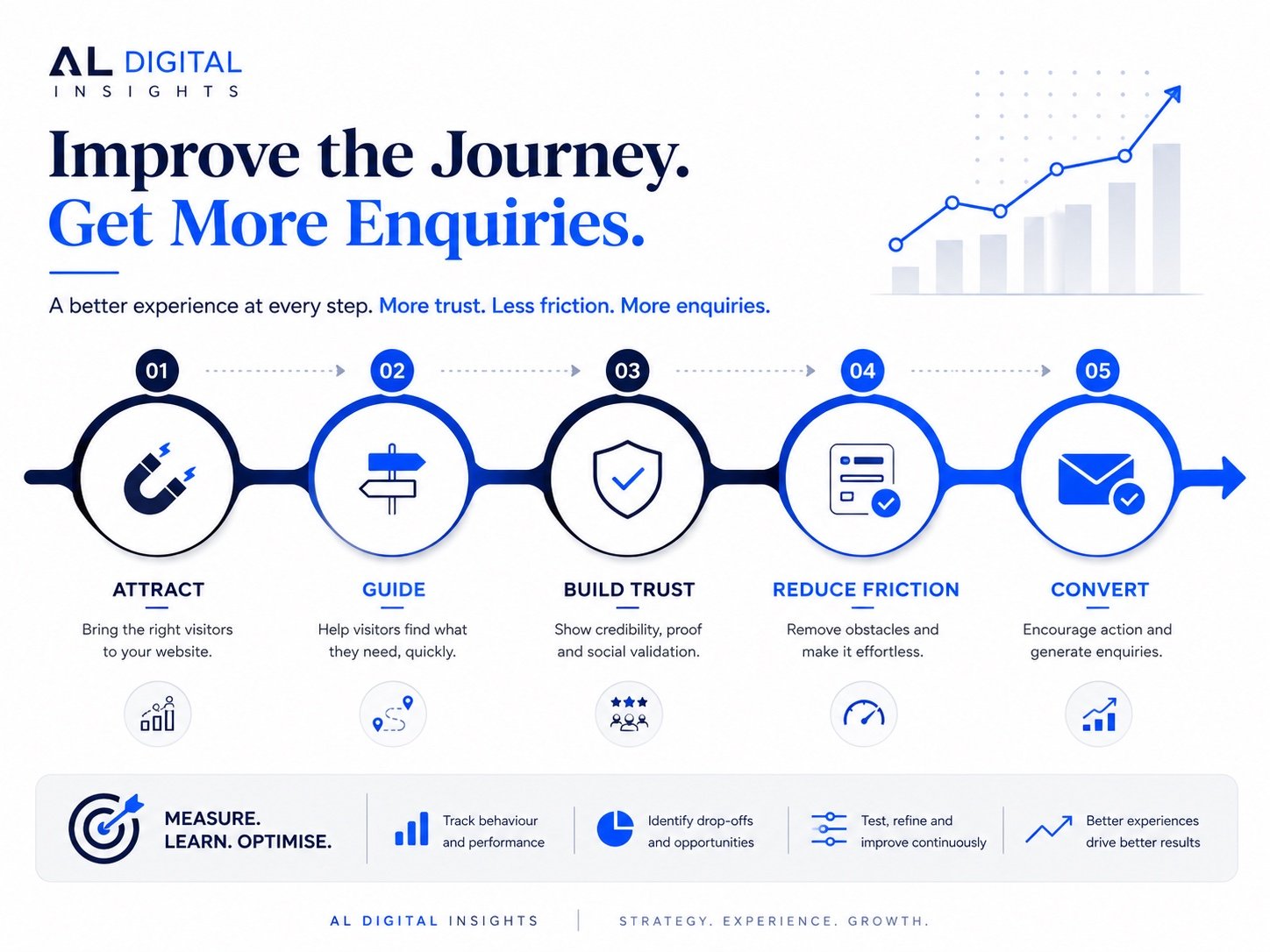
For lead generation, useful signals can include traffic quality, service-page engagement, calls to action, form starts, successful enquiries, bookings and lead sources.
Focus on commercially meaningful actions rather than vanity metrics alone.
Test the Journey Yourself
Choose one important service and approach the website as though you are a first-time customer.
Find → Understand → Trust → Act → Complete
Ask whether anything was confusing, whether questions remained unanswered, whether the next step was obvious, whether anything felt unnecessarily difficult, whether the form worked, whether confirmation arrived and whether the mobile experience was easy.
Even simple testing can reveal problems that become invisible to people who use the website every day.
Customer Journey Checklist
- Is the main offer immediately clear?
- Can visitors find important services easily?
- Does each key page have a clear purpose?
- Are trust signals visible?
- Are calls to action easy to find?
- Are forms short enough?
- Is mobile usage comfortable?
- Are booking and payment journeys simple?
- Do customers know what happens after submitting?
- Are unnecessary manual steps creating delays?
- Are successful enquiries being tracked?
- Are analytics being reviewed?
If several answers are no, improving the journey may create more value than simply attracting more visitors.
If the current platform makes those improvements difficult, review whether the business needs to improve, redesign or rebuild its website.
Improve the Journey Before Increasing Traffic
Traffic is important. But sending more visitors into a confusing journey simply creates more people who leave.
Before investing heavily in acquisition, make sure the website can support the visitors who already arrive.
A stronger customer journey can help the business make better use of SEO traffic, paid advertising, referrals, social media, direct visitors and local search.
The objective is simple: more of the right visitors successfully reaching the next step.
Explore more practical guidance in the AL Digital Insights hub.
Want to make your website easier for customers to use — and easier to enquire through?
AL Digital builds websites and connected digital systems around customer journeys, enquiries, bookings, payments and business requirements.
Explore Our ServicesGet a Free Quote